
Self-adhesive Cable Clips · 100 Pack
Give loose cables a planned route with a generous pack of small adhesive clips.
$19.98
Manufacturer product imagery. Screen views are illustrative; shown phones and optional accessories are not included unless stated in the final package.
Front, rear and two inward-facing views for drivers who want more cabin context from a single recording system.
Save $57.02 while launch pricing is active.
Supplier fulfilled · Shipping calculated at checkout
Final camera units, mounts, cables and other inclusions will be specified in the Drive4K package.
Optional LTE hardware, connectivity plans and remote monitoring are separate. Australian operation is not an included promise.
Not right for your car? Contact us within 30 days.
Estimated 2–4 business days on current Australian supplier routes. Shipping calculated at checkout.
Encrypted checkout. Supported payment methods shown before payment.
Check what is already included, then choose any extras that suit your car and devices.
Swipe to see optional extras →
Give loose cables a planned route with a generous pack of small adhesive clips.
$19.98
Four useful shapes for lifting interior trim and helping route accessory cables neatly.
$19.00
A mix of square and round double-sided pads for suitable small accessory mounts on smooth surfaces.
$47.50The N5S covers front, front cabin, rear cabin and rear. Decide what each lens should see before mounting the system.
The inward-facing view at the rear can add context that a camera at the front of the cabin cannot see.
Vantrue lists wireless app review and large-capacity storage support for managing the four-channel setup.
The N5S adds a second inward-facing view to the front, rear and front-cabin arrangement. It is worth considering when passenger areas or the back of the cabin matter to your recording needs. Four views also mean more files to manage and more attention to camera placement; they do not create a seamless view of everything around the car.
Two road-facing views and two inward-facing views cover different parts of the journey. Their usefulness depends on placement.
Each view depends on a clear lens and careful installation. Viewing angles and sources are below the illustration.
 Front unit
Rear unit
Front of vehicle ↑
Front unit
Rear unit
Front of vehicle ↑
AI-generated vehicle illustration. Cones use listed angles where available, or estimates where unconfirmed. They are not measured horizontal coverage or detection range. Cabin fields are cropped to the interior; pillars, seats, lens aim and recording mode affect the actual view.
Angles follow the N5S English manual. Another language edition lists 160° rear instead of 165°; confirm the supplied version. Measurement axes are not specified. Four views do not mean uninterrupted 360° coverage.
Manufacturer manual ↗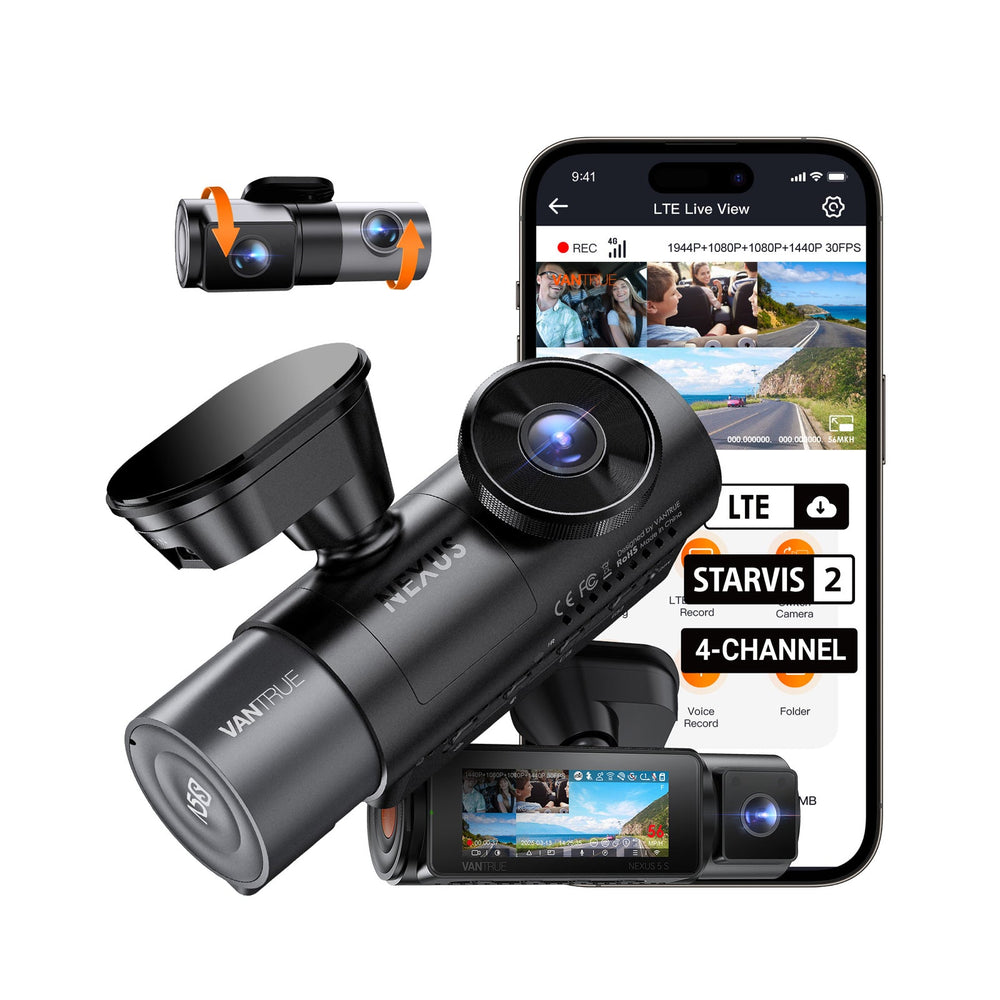
Set up while parked, then keep a simple routine for checking and saving your footage.
While parked, check each camera view, date and recording settings. Format a supported card using the model’s instructions.
Use the manufacturer’s supported app or player. Inspect the relevant channels together and keep the original files.
Save important clips outside the camera before loop recording replaces them. Recheck recent recordings periodically.
Choose this format for a defined recording need, with a practical plan for positioning and storage.
Ask a setup question →Seat backs, headrests, passengers and cargo can obstruct inward-facing cameras. Check the framing with the vehicle in normal use.
Plan the connection between the front and rear units, including access to the controls and card.
Use supported endurance storage and a suitable parking-power setup. More channels produce more files to inspect and preserve.
Final camera units, mounts, cables and other inclusions will be specified in the Drive4K package.
Optional LTE hardware, connectivity plans and remote monitoring are separate. Australian operation is not an included promise.
Clear package details, practical fitting information and a direct contact when you need help.
Contact Drive4K →Check the product’s fit, power and package details before installing it in your car.
Explore installation guidance →| Included | Arrange separately |
|---|---|
| Final camera units, mounts, cables and other inclusions will be specified in the Drive4K package. | Optional LTE hardware, connectivity plans and remote monitoring are separate. Australian operation is not an included promise. |
Buying this as part of a dashcam setup? Our free guide covers power, recording cards and footage checks.
Read the Dash Cam Setup Guide →Specifications describe the manufacturer listing, not independent footage testing. Image detail varies with lighting, motion, settings and camera position.
| Model | Vantrue Nexus 5S / N5S |
|---|---|
| Recorded views | Front, front cabin, rear cabin and rear |
| Camera role | Four-channel dash cam |
| Sensors | Four STARVIS 2 sensors |
| Connectivity | 5GHz Wi-Fi and free app |
| Location data | Built-in GPS listed |
| Storage | Up to 1TB microSD |
| Power architecture | Supercapacitor system described by Vantrue |
Check the exact model, vehicle fit and package before choosing your setup.
Explore support & care →Front, front cabin, rear cabin and rear. The two inward-facing cameras look into the cabin from different positions.
No. The cameras record distinct views with possible obstructions and gaps. Check the framing of each lens in your own vehicle.
Additional channels produce more recording files. Use a supported endurance card and check the recording settings; retention time depends on the resulting bitrate and capacity.
No. Optional cellular hardware, a service plan and supported regional operation are separate from the core recording setup. Australian connectivity is not included or promised on this page.
Manufacturer artwork can show optional connected features. Choose the core recording setup first.